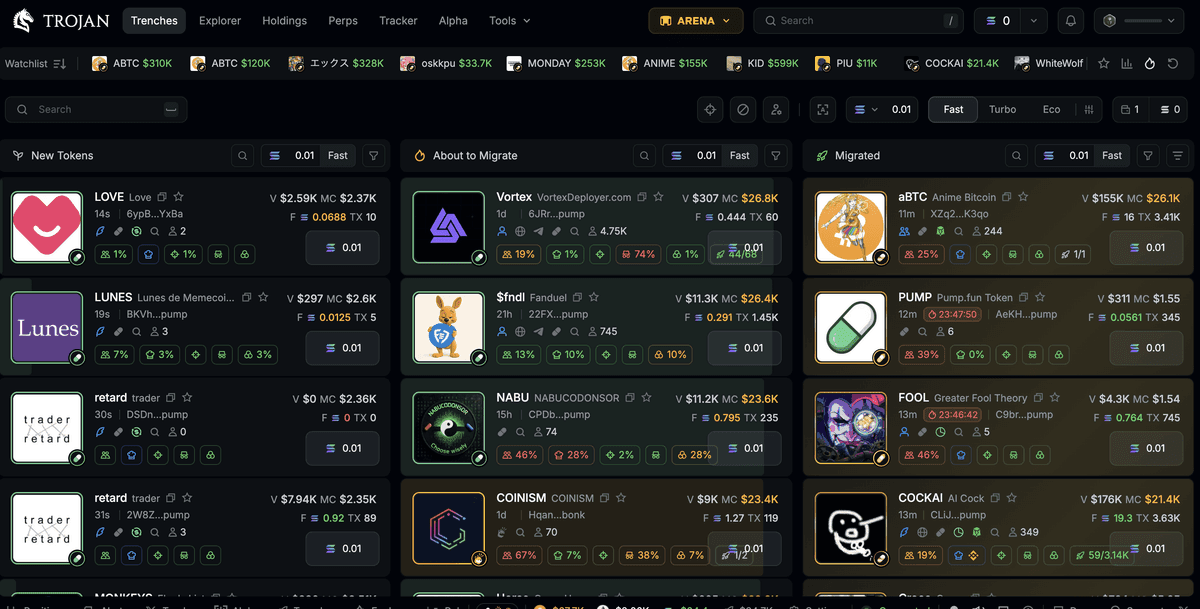
Missing a 10x on Solana because your entry was three blocks late — or worse, watching a memecoin rug before your stop-loss even triggered — is the kind of loss that sticks. If you've been anywhere near Pump.fun launches or Raydium snipes, you already know that execution speed isn't a nice-to-have. It's the entire edge. And that reality is exactly why this Trojan bot review exists: to cut through the noise and tell you whether the platform still earns your SOL in 2026.
With dozens of Telegram bots now competing for your deposits, picking the wrong one doesn't just cost you fees; it costs you the trade entirely. A slow fill on a memecoin launch is a losing fill. A bot that drops during congestion is a bot that eats your alpha. The stakes are real, and the differences between platforms aren't cosmetic — they're financial.
This review breaks down exactly what Trojan offers today, where it outperforms rivals like Bonkbot and Photon, and where it still has genuine gaps. Fees, sniper mechanics, copy trading depth, custody trade-offs — all of it. No filler, no hype, just what you need to make the call with your eyes open.
Why Your Choice of Solana Trading Bot Still Matters in 2026
The 2024–2025 memecoin supercycle didn't just create millionaires. It created an arms race. Trojan, Bonkbot, Maestro, Photon, Axiom — every one of these platforms launched or matured because traders demanded faster, more automated execution on Solana. That competition benefits you, but it also means the bot you choose directly impacts your PnL. This isn't a preference thing like picking your favorite charting tool. It's structural.
Here's why. Solana's ~400-millisecond block times make it the fastest major chain for trading, but that speed means the window to snipe a new pool or front-run momentum is measured in seconds, not minutes. The difference between your transaction landing in block N versus block N+3 can be the difference between a 5x and a bag you can't sell. Your bot's RPC infrastructure, its priority fee handling, its ability to detect new liquidity — these aren't backend details. They're alpha.
Trojan claims the top spot by volume: over $23.4 billion in lifetime volume, more than 2 million total users, and approximately 20,000 daily active users executing over 100,000 trades per day. Those are real numbers. On its record single day in January 2025, the platform processed $363 million in trading volume — over 800,000 trades generating $2.8 million in fees.
But "biggest" doesn't automatically mean "best for you." Volume dominance reflects network effects and early-mover advantage. It doesn't guarantee the tightest execution or the lowest cost on your specific trade. This review validates those claims against what actually matters: speed, fees, features, and reliability under pressure. It does not cover Solana basics — if you're here, you already know how to send SOL to a wallet.
How Trojan Bot Actually Works — The Mechanics Under the Hood
Wallet Architecture and Custody
When you start Trojan, the bot generates a Solana keypair directly inside the Telegram interface. This is not the same as connecting a Phantom or Solflare wallet. Your private key exists within Trojan's infrastructure, and the bot holds custody of your funds. That's a meaningful trade-off: you get instant execution without wallet-signing pop-ups, but you're trusting the platform with your keys.
This custodial model means that if Trojan's infrastructure were ever compromised, funds stored in bot wallets would be at risk. You can withdraw to an external wallet at any time, and you should keep only working capital inside the bot. The platform supports Multi-Wallet management — up to 10 wallets generated within the bot — so you can segregate funds by strategy or risk level.
Trade Routing and Execution
Trojan routes swaps through Jupiter aggregator integration, pulling from Solana's deepest liquidity pools. But the real differentiator is BOLT — Trojan's execution engine that targets under 2 seconds per trade with no additional fees. For high-volume traders holding 50+ SOL in their wallet, BOLT PRO kicks in with enhanced execution that prioritizes transaction inclusion during peak network activity.
On the MEV front, Trojan sends transactions through private JITO validator slots. This keeps your trades out of the public mempool, which means sandwich bots and front-runners can't see — or exploit — your pending transactions. Roughly 30% of validators provide JITO-protected slots, so there's a slight trade-off: MEV protection may marginally impact speed, but it prevents the kind of value extraction that quietly drains your PnL on unprotected trades. You can toggle MEV protection on or off for buys and sells separately.
Sniper Engine and Pool Detection
Trojan's New Pairs / Pool Scanner is among the fastest on Solana. It monitors for new liquidity additions across Raydium pools, Pump.fun listings, and contract renouncements through 5 dedicated scanner topics. You get instant notifications on new launches, renounced contracts, and burned liquidity — the signals that matter most when evaluating whether a fresh token is worth sniping or avoiding.
The Upcoming Launches feature integrates directly with Pump.fun's bonding curve tracking, giving you advanced access to tokens before they migrate to Raydium. Combined with Auto Buy — which you can configure based on minimum liquidity, maximum market cap, and specific token criteria — the sniper engine can execute without you manually pasting a contract address every time.
A Common Mistake and Its Fix
One of the most frequent errors traders make here: leaving MEV protection toggled off because they heard it's "faster." On a low-liquidity Pump.fun launch, a sandwich attack can cost you 5-15% of your position value in a single transaction. Fix: Keep MEV protection enabled by default for buys. Only disable it when you're trading high-liquidity established tokens where sandwich risk is minimal and speed matters more.
Setting Up Trojan Bot — Step-by-Step From Zero to First Trade
1. Find the official bot on Telegram. Open Telegram and navigate to the verified Trojan bot through the official link — do not search random usernames. Scam impersonators actively copy Trojan's branding and will drain any SOL you deposit. The safest route is to use a verified link from a trusted source, such as Trojan's official bot link. Once you're in the correct chat, you'll see the bot's verified badge and interface menu.
2. Generate your Trojan wallet.
Tap /start in the bot chat. Trojan immediately generates a Solana wallet and displays your deposit address. Copy this address carefully — this is where you'll send SOL to fund your trades. The wallet is created inside the bot, not linked to any external wallet app, so there's no browser extension or QR code to scan. You'll see your wallet balance displayed in the main menu once it's created.
3. Back up your private key immediately. This is the step most beginners skip, and it's the one that burns them. Navigate to the wallet settings within the bot and find the private key export option. Copy your private key and store it in a secure, offline location — a password manager or a physically written backup. If Trojan ever experiences downtime or you lose access to your Telegram account, this key is the only way to recover your funds independently.
4. Fund the wallet with SOL. Send SOL from a centralized exchange (Coinbase, Binance, Kraken) or from your personal Solana wallet to the deposit address the bot generated. A practical starting point is 0.5–1 SOL — enough to cover Solana priority fees, the bot's trading fee, and at least one meaningful position. Sending less than 0.2 SOL often leaves you unable to cover transaction costs after a single trade, so don't lowball the initial deposit.
5. Configure your default trade settings. Before placing any trade, open the settings panel and adjust four things. Slippage tolerance: controls how much price deviation you'll accept (lower is tighter, higher means more fills on volatile tokens). Priority fee tier: choose from low, medium, high, or custom — this determines how much extra SOL you pay to get your transaction included faster on Solana. Buy amount presets: set quick-buy buttons for amounts like 0.1, 0.25, and 0.5 SOL so you can execute without typing a number each time. Auto-sell targets: define take-profit and stop-loss percentages that the bot will execute automatically, 24/7. The bot offers both Simple mode for beginners and Advanced mode for granular control — start with Simple if this is your first Telegram bot.
6. Place your first manual buy or snipe. Paste a token's contract address into the bot chat. Trojan pulls up the token info, current price, and liquidity stats. Set your position size, confirm your slippage and priority fee settings for this specific trade, and define a take-profit and stop-loss before you hit confirm. Setting exit targets before entry — not after — is what separates planned trades from panic sells.
7. Enable copy trading or auto-snipe (optional). Trojan's Copy Trading feature lets you auto-follow buys and sells from any specified wallet address. Navigate to the copy trading menu, paste the wallet you want to follow, and configure your parameters: investment caps per trade, multi-take-profit levels, and whether to DCA on copied trades. Auto Buy works similarly but triggers on token criteria rather than wallet activity — set your minimum liquidity and maximum market cap thresholds and let the scanner do the watching.
8. Test with a small position first. Don't commit real size until you've verified every setting works as expected. Place a sub-$20 trade on a liquid token, watch the execution speed, confirm your auto-sell triggers are active, and check the fees deducted. This one test trade will teach you more about the bot's behavior than any guide — including this one. Once you're confident the setup performs, scale up deliberately.
Trojan Bot Fee Structure — What You Actually Pay Per Trade
Trojan charges a flat 1% fee per successful transaction. That fee applies on both buys and sells. Critically, no fee is charged on failed transactions — so if your snipe doesn't fill because of slippage or congestion, you don't pay Trojan anything. You still lose the small Solana network fee, but the platform fee is zero on failures.
If you sign up through an ApexAlpha referral, the fee drops to 0.9% per successful transaction — a 10% discount on the standard rate. No additional fees are charged for BOLT, BOLT PRO, MEV protection, or any other premium feature. Everything is included in that flat percentage.
The Hidden Cost: Priority Fees
Solana priority fees are separate from Trojan's platform fee and paid directly to validators. You set these yourself in the bot's settings (low, medium, high, or custom). During normal network conditions, a priority fee might cost $0.01–0.05 per transaction. During congested periods — like a major Pump.fun launch — custom priority fees can spike to $0.50 or more if you want your transaction included quickly. These add up, especially on high-frequency strategies.
Worked Example: $500 Memecoin Trade, Round Trip
Here's what a typical round-trip trade costs:
- Buy: $500 position × 1% fee = $5.00 + priority fee (medium tier) ≈ $0.10–$0.50
- Sell: $500 exit × 1% fee = $5.00 + priority fee ≈ $0.10–$0.50
- Total round-trip cost: approximately $10.20–$11.00 on a $500 trade = ~2% drag
Scale that to a $1,000 trade and you're looking at ~$20–$22 in fees round trip. Compare this to swapping directly on Jupiter, where the swap fee is roughly 0.1–0.3% with no automation, no auto-sell, no sniper, and no copy trading. You're paying for speed and tooling, not just a swap.
Fee Comparison: Trojan vs Competitors
| Feature | Trojan | Bonkbot | Photon | |---|---|---|---| | Standard Fee | 1% per trade | 1% per trade | 1% per trade | | Referral Fee | 0.9% per trade | Varies | N/A (web-only) | | Failed Trade Fee | None | None | None | | Premium Features | Included (BOLT, MEV protection) | Basic | Web terminal included | | Referral Program | Up to 35% commission tiers | Yes | Limited |
Sign up via Trojan to get the 0.9% fee rate (10% off standard) — exclusive to ApexAlpha referrals.
Who Should Use Trojan — And Who Should Look Elsewhere
Trader Profile 1: The Pump.fun Sniper
You live and die by launch speed. You're watching new token deployments, evaluating bonding curves, and need your buy to land within seconds of a Raydium migration. Trojan's New Pairs / Pool Scanner, BOLT execution targeting under 2 seconds, and Pump.fun bonding curve tracking give you the infrastructure to compete. The Backup Bots deployed during peak usage mean your snipe attempts don't die when everyone else is also hammering the network. If speed on fresh launches is your primary edge, Trojan is built for exactly this.
Trader Profile 2: The Copy Trader
You've identified wallets that consistently hit early on memecoins, and you want to mirror their entries without staring at a screen 16 hours a day. Trojan's Copy Trading is more configurable than most competitors — you can set investment caps, multi-take-profit levels, and layer DCA on copied trades. This depth of customization means you're not blindly mirroring every move; you're filtering through your own risk parameters. If you're building a copy trading strategy across multiple wallets, Trojan's implementation is one of the most mature on Solana.
Trader Profile 3: The Multi-Wallet Operator
You run separate wallets for sniping, swing trades, and airdrop farming. Managing all of that across different apps is a nightmare. Trojan lets you generate and manage up to 10 wallets within a single bot interface, switch between them instantly, and set different strategies per wallet. Combine that with Auto Sell running 24/7 monitoring across all positions and you have a centralized command center inside Telegram.
Who Should Look Elsewhere
The cost-conscious DeFi trader. If you primarily trade established Solana tokens — not fresh launches — the 1% fee per trade adds up fast and the speed advantage matters less. Swapping directly through Jupiter or Raydium at 0.1–0.3% is significantly cheaper when you don't need sniping, auto-sell, or copy trading. The automation premium only makes sense if you're actually using the automation.
The custody-conscious trader. Trojan's custodial model means your funds live inside the bot's wallet infrastructure. If you're uncomfortable with any platform holding your private keys — and that's a completely valid stance — you'll want a web-based alternative like Photon or Axiom where you connect your own wallet and sign each transaction yourself. Convenience and custody are inversely correlated here, and only you can decide where that line sits.
Common Trojan Bot Mistakes — And Exactly How to Fix Them
Mistake 1: Using Default Slippage on Volatile Launches
Why traders make it: Trojan's default slippage settings work fine for liquid tokens, so traders never bother changing them. Then they paste a Pump.fun contract address 10 seconds after launch, and the default slippage is either too tight (transaction fails) or too loose (fills at an absurd price 40% above the expected entry).
Fix: Never use a single slippage setting for all trades. Set lower slippage (1–5%) for established tokens with deep liquidity. For fresh Pump.fun launches where price moves by the second, manually increase to 15–25% only after checking the token's current liquidity depth. Adjust per trade, not per session.
Mistake 2: Running Low Priority Fees During Peak Congestion
Why traders make it: Setting the priority fee to "low" saves a few cents per trade, and during quiet hours it works perfectly. But during a hyped launch — when thousands of traders are sniping the same pool — low priority fees mean your transaction sits in the queue while faster-paying traders fill ahead of you. Your snipe never lands.
Fix: Switch to "high" or custom priority fees during known launch windows. Yes, you'll pay $0.30–$0.50 more per transaction. But a filled snipe at $0.50 extra cost beats a missed snipe at $0.00 extra cost every single time. Use "low" only during off-peak hours on routine trades.
Mistake 3: Not Backing Up the Private Key
Why traders make it: The initial setup flow is exciting — fund the wallet, make a trade, watch the PnL. Exporting and storing the private key feels like boring housekeeping. Until the day you lose access to your Telegram account, or the bot goes offline during a Solana network event, and your SOL is locked behind a keypair you never saved.
Fix: Export your private key the moment you generate your wallet. Store it in a password manager or write it down and keep it offline. Do this before you send a single lamport to the wallet. Treat this as step zero, not an optional cleanup task.
Mistake 4: Treating Auto-Snipe as Passive Income
Why traders make it: The Auto Buy feature feels like a money printer — set your criteria, let the scanner find tokens, and watch the buys roll in. But auto-sniping without aggressive filters means you're buying every token that meets minimum liquidity thresholds, including rugs, honeypots, and tokens with mint authority still enabled. Auto-snipe without auto-sell limits is how traders quietly bleed their entire wallet.
Fix: Pair every Auto Buy configuration with strict Auto Sell rules — a take-profit target and a stop-loss for every position. Set maximum market cap and minimum liquidity thresholds conservatively. Review your auto-snipe results daily and tighten filters based on what's hitting versus what's rugging. Automation is a tool, not a strategy.
Pro tip: Run a dedicated wallet for auto-sniping with no more than 1–2 SOL at risk. Keep your main trading capital in a separate wallet that you manage manually. This limits the damage if your filters aren't tight enough.
Frequently Asked Questions
Is Trojan bot safe to use in 2026?
Trojan uses a custodial model — your wallet's private key is generated and held within the bot's infrastructure. This means you're trusting the platform with your funds while they're deposited. MEV protection via private JITO validator slots keeps your transactions hidden from front-runners, which reduces on-chain exploitation risk. However, the custodial aspect means you should only keep active trading capital in the bot and withdraw profits to a personal wallet regularly. Always export and back up your private key immediately after wallet generation.
How fast is Trojan bot compared to other Solana trading bots?
Trojan's BOLT execution engine targets under 2 seconds per trade, with no additional fee for this speed. For traders holding 50+ SOL, BOLT PRO provides enhanced priority during peak congestion. The platform also deploys Backup Bots during high-traffic periods to ensure trades process even when Solana's network is under stress. Exact speed varies by network conditions, but the combination of BOLT, JITO slots, and backup infrastructure makes Trojan one of the fastest Telegram-based options on Solana.
What are Trojan bot's fees in 2026?
Trojan charges 1% per successful transaction at the standard rate, or 0.9% per successful transaction with a referral link. No fee is charged on failed transactions. There are no extra fees for BOLT, BOLT PRO, MEV protection, copy trading, or any other feature — everything is included in the flat percentage. Solana priority fees (paid to validators) are separate and user-configurable.
Can I use Trojan bot for copy trading?
Yes. Trojan's Copy Trading feature lets you auto-follow any specified Solana wallet address. You can customize investment caps per trade, set multi-take-profit levels, and enable DCA on copied trades. The bot follows buys and sells from the target wallet through supported pools and Jupiter routing. It's one of the more mature copy trading implementations among Telegram bots, with enough configuration to avoid blind mirroring.
Does Trojan bot work on chains other than Solana?
Trojan is Solana-primary. It does include a built-in ETH-SOL bridge that lets you transfer funds between Ethereum and Solana without leaving the bot, which is useful if you're moving capital from an Ethereum wallet. However, actual trading execution is focused on Solana. If you primarily trade on Ethereum, Base, or other EVM chains, you'll need a different tool for those executions.
The Verdict: Should You Trade With Trojan in 2026?
Trojan is still the largest Telegram trading bot on Solana by volume — $23.4 billion in lifetime volume and over 2 million users don't lie about product-market fit. For high-frequency memecoin traders, Pump.fun snipers, and copy traders who want everything inside Telegram, it's the most complete package available right now. The 1% fee stings on larger positions, but BOLT execution, MEV protection, and backup bot uptime during congestion deliver tangible edge that cheaper alternatives don't match. If you trade Solana memecoins more than a few times a week, Trojan deserves a serious look.
Memecoin trading carries significant risk. Only trade with funds you can afford to lose. Always do your own research before entering any position.